Overview
You may experience that your Risco or Indiana cash drawer is not opening and/or closing properly. It’s possible that the cash drawer was misaligned when it was installed or has shifted in the cash drawer casing.
Troubleshooting
- Ensure the cash drawer lock is set to the correct position. The key should be horizontal within the lock.
- Ensure the signal from LubeSoft is being received by the cash drawer consistently by checking the print queue and the lights on the back of the cash drawer.
- Risco cash drawers have 3 lights: green, yellow, and red. The green light should be lit if the power is connected. The red light should be lit if the drawer is open. The yellow light should be lit when the drawer is sent a signal to open.
Removing the Cash Drawer
- Unlock the cash drawer and open the drawer.
- Remove the coin tray.
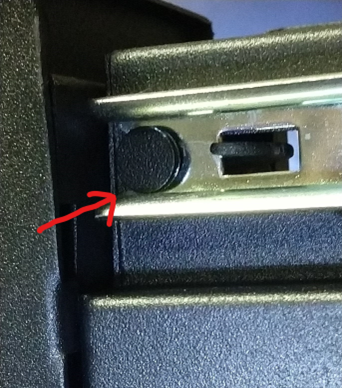
- Pull the drawer out and check the rear clips. Make sure the end of the rail lines up with the circular peg underneath the drawer and that the clip reaches through the rectangular gap in the rail to lock it in place.
Identifying Misaligned Tabs
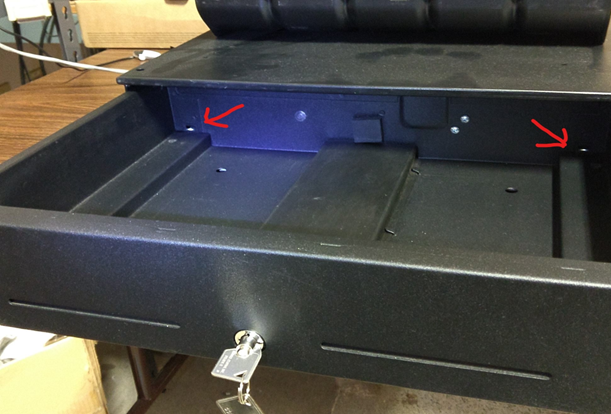
Tabs are not visible when incorrectly installed.

Tabs are visible when the cash drawer is correctly installed.
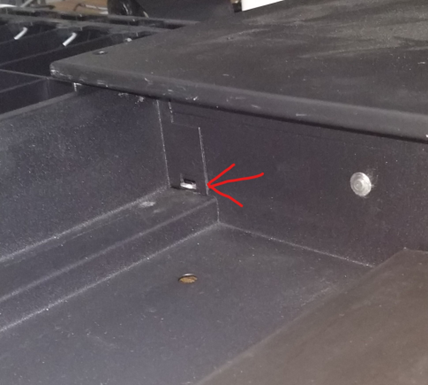
Check that the front post of the drawer is seated in the slot on the front rail. The below image shows a correctly seated front post. This image is taken looking up from the underside of the drawer.