
This document is intended to be an overview of ISI Central security settings based on the user and how it relates to accessing ISI Central Reporting, Setups, and Setup Record and Field Level security. This document is not intended to be a step-by-step instruction on setting up a user or the security settings.
ISI Central User setup is required for an individual to have access to ISI Central via their own personal login.
To add an ISI Central user, a valid email address, name (first and last), company, title, phone number, and password are required fields. The email address is used for the user to initiate the login process. The user will also need to set up their password.
Note: ISI Central users are added by designated administrators (typically the store owner or manager) for stores. ISI sets up the listed owner as the administrator for any new onboarding for ISI Central.
When the user is added to ISI Central, the administrator will set the initial security settings for the user. This includes the access the user will have to ISI Central Report folders, ISI Central Setups, and the user’s “Data Edit Security Level”.
In ISI Central Setups, there are several access options to select for the user. The access options are “Read” (View), “Update” (Edit), “Create” (Add), and “Delete”. Access can be given for all options, or just select options per ISI Central Setup, such as “Employee”, “Inventory”, “Fleet”, etc. As an example, if the user is to have access to view a setup, but not make changes, then only place a checkmark in the “Read” field. If the user is to have read and update access, but not add or delete, then only place a checkmark in the “Read” and “Update” fields.
Note: Even if a user has access to a setup, such as Inventory, other restrictions may apply to the user based on Record Level and Field Level security settings described below.
The “Data Edit Security Level” field in the “User Information” section relates to edit security in ISI Central Setups. ISI Central Setups has two types of data edit options, “Record Level” and “Field Level”. The “Data Edit Security Level” setting is a number, which can be between blank or 0, and 90.
The screenshot below shows the Data Edit Security Level field on the User Information screen.
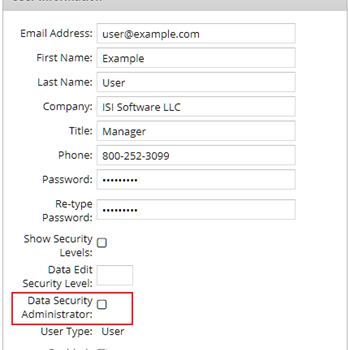
The record and field level settings look at the user’s “Data Edit Security Level” setting to determine if the user has access to edit the record or field. For a user to edit a record or field, the “Data Edit Security Level” setting on the user must be equal to or higher than the security level setting on the record or field.
The “Record Security Level” field is a way to restrict editing of specific records in a setup based on the user’s “Data Edit Security Level” setting. The “Record Security Level” settings allow a user to update rights to some setup records, but not all records, within a setup group. The “Record Security Level” setting restricts access to the entire record.
Example: A user may have access to edit some fleet records, but if the fleet “ABC100” has a “Record Security Level Setting” above the user’s “Data Edit Security Level”, the user will not have access to edit the fleet.
Record Security Level setting is available in the following Central Setups:
|
|
Note: The “Record Security Level” setting is not available for access in the “Calendar” or “Promotion Single Use” setup.
The “Record Security Level” setting field is located near the bottom of each available setup record.

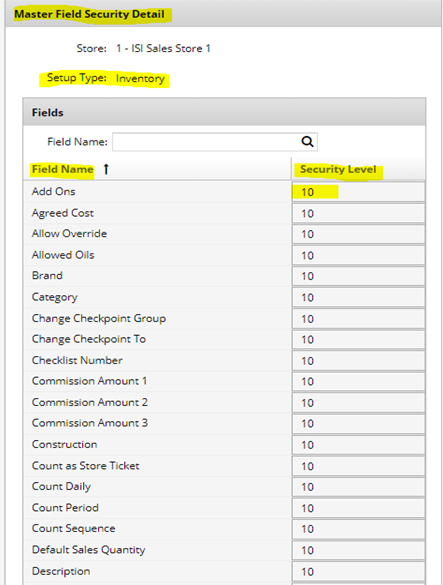
The “Field Security Level” setting is currently only available for “Inventory Setups”. “Field Security Level” settings for inventory provide the ability to restrict access to some fields on an inventory item but allow editing other fields in a record.
Example: The user may have data edit security to update the inventory agreed cost and retail price but not be allowed to edit the item description or other fields on the individual record.
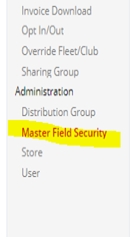
“Field Security Level” setup is handled via “Master Field Security” setup. The “Master Field Security” settings may be set in all inventory fields. The “Field Security Level” is designed to allow a different security level to be set for each individual field in inventory setups.
|
|
|
Each organization can determine what the different “Data Edit Security Level” numbers mean within their organization. Each organization can set up their own matrix that will best suit their organization.
One option is to create organization groups that will best represent how the organization wants to manage the “Record and Field Level” security settings in ISI Central Setups.
The following chart is a suggestion for using Data Edit Security Level settings, based on using personnel roles within the organization.
|
Role |
Security Range |
Additional Information |
|
Store Level |
1-9 |
|
|
Area Manager |
10-19 |
|
|
General Manager |
20-29 |
|
|
Office staff |
30-39 |
|
|
Owner/Franchisee |
40-49 |
|
|
|
|
|
|
Corporate/Franchisor |
|
|
|
Specific Setup |
50-59 |
i.e. Fleet, Promotion |
|
Inventory Field control |
60-69 |
|
|
Admin |
70+ |
|
Note: These “Data Edit Security Level” numbers do not relate to the ”Employee Security” level in LubeSoft. This is specific to ISI Central users only.